BAS-SEN

4-string bass practice studio

Take the bass off the wall.
It's time to actually play.

Load your own local audio or MIDI files on Windows, isolate the bassline 100% locally in seconds, follow every fret on a visual E A D G neck, and lock in with your USB audio interface.

  • Free for Windows
  • 100% Offline Engine
  • $4.99 One-Time
Download Free Demo (Windows)

Free · 3.5 MB · No account required

100% Offline Studio DSP & AI separation · Keep the kick drum · Note detector
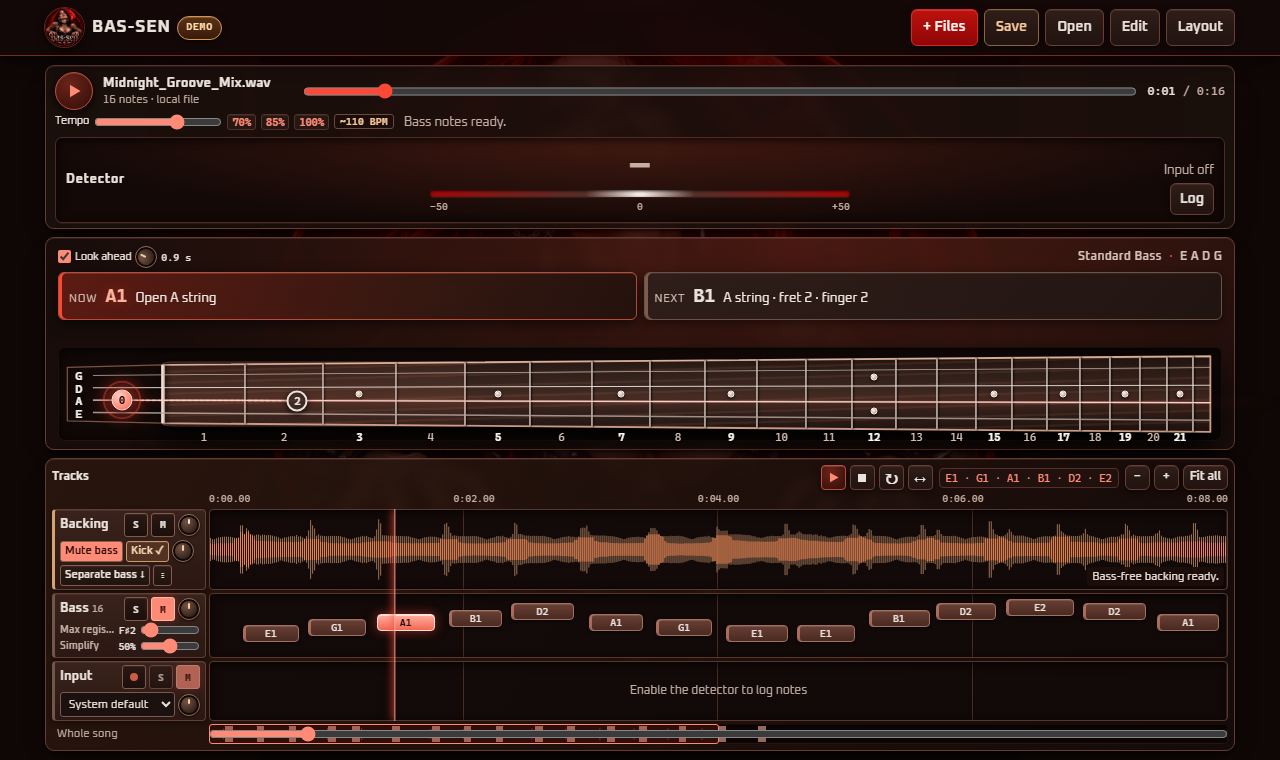
BAS-SEN Studio (Live App Capture)E · A · D · G (21 frets)
Live screenshot of BAS-SEN displaying separated Midnight_Groove_Mix.wav with dual-layer bass waveform, active A1 open string and upcoming B1 note at fret 2, plus note timeline.
A/B STEM OUTPUT 0:00 / 0:08

Tailored to your setup

Configure the neck and studio your way

Adapt the fretboard geometry live to your left or right hand, portrait monitors, side-by-side DAW setups, and visual contrast needs.

  • Fretboard perspective: portrait & split-screen layouts fit neatly on vertical monitors or side-by-side with your DAW, plus full Left-handed mirror mode.
  • Layout & clarity: flip string order independently, swap fretboard and timeline, switch to High Contrast mode, and toggle EN/PL UI anytime.
  • Practice mixer: dedicated S (Solo), M (Mute) and rotary gain controls for Backing, Kick drum, Bass, and USB Input.
G
D
A4
E1

True-to-scale 34" standard bass neck - exact same switches are built right into BAS-SEN's Layout panel.

How it works · 3 steps

From your music folder to in-the-pocket groove

Follow along at full speed or slow a tricky riff to 70% without pitch shift. Watch the uncut 33-second studio walkthrough below.

Step 01 · Isolate & Keep the Kick

Drop any mix and split the bassline locally

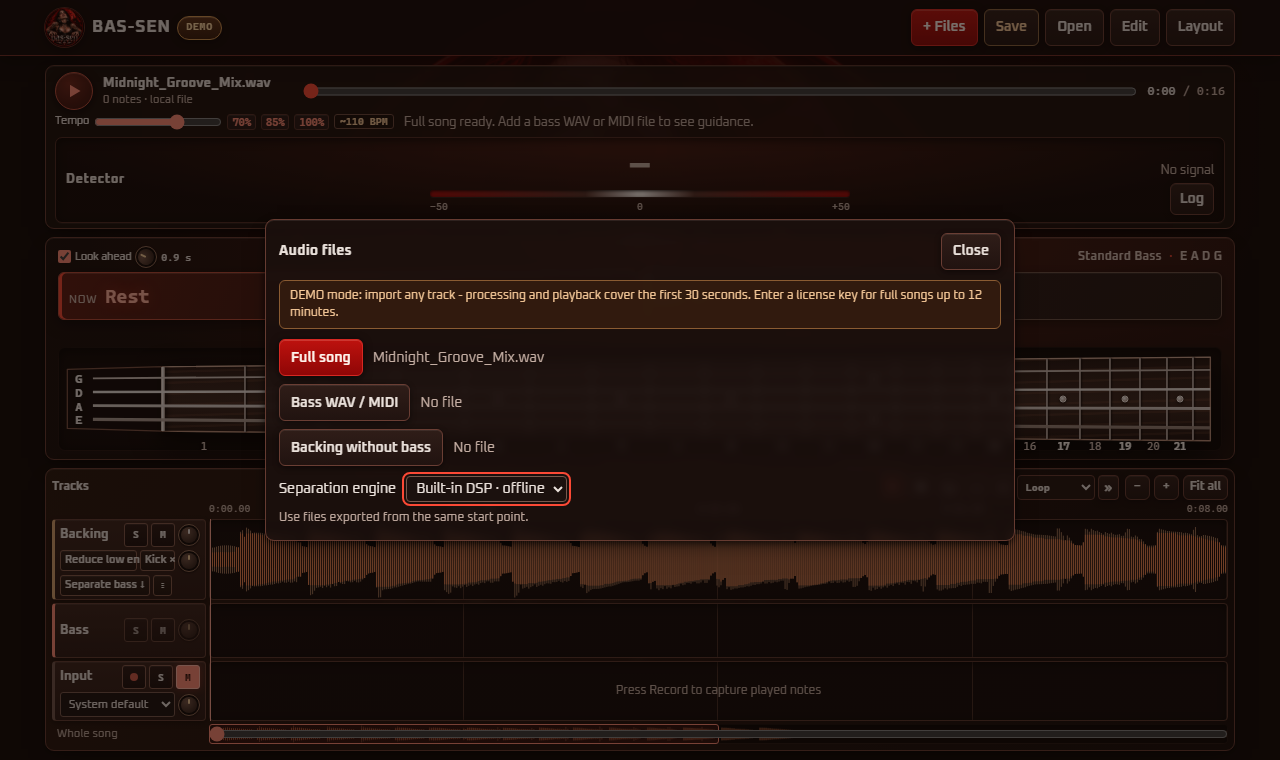
Load MP3, WAV, FLAC, OGG, or MIDI straight from your drive. The built-in studio-grade audio engine separates the bass stem, bass-free backing, and kick drum on your PC with zero cloud uploads - preserving the drum punch while keeping drum hits out of your bass notes.

Step 1 · Song Import & DSP / AI Engine ChoiceMidnight_Groove_Mix.wav
BAS-SEN Audio files panel open over loaded Midnight_Groove_Mix.wav showing built-in offline DSP and local Demucs AI options alongside the dual-layer bass waveform.
Step 02 · Simplify & Refine

Dial in clean grooves and edit Suno AI or DAW MIDI

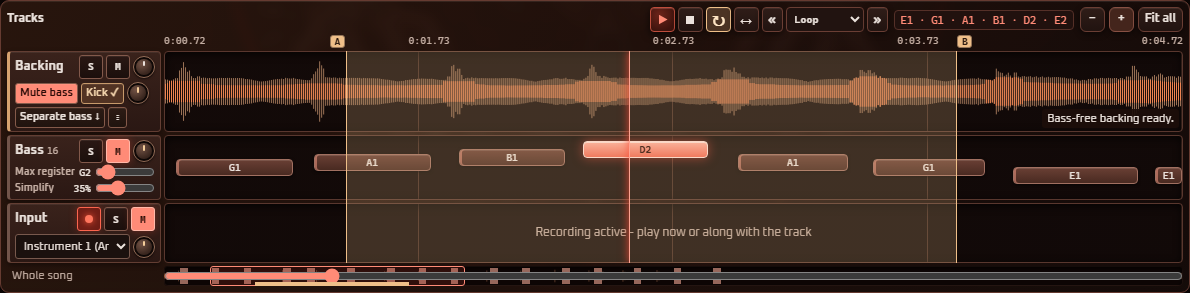
Zoom any bar, clean up dense mixes live using Max register and Simplify sliders, or double-click any note on the timeline to adjust timing when importing tracks with drifting tempo from Suno AI.

Step 2 · Timeline Zoom & Live Note FiltersMax register G2 · Simplify 35%
BAS-SEN timeline closeup with A-B loop range, DJ loop jump controls, Max register G2 and Simplify 35% note filters active.
Step 03 · Loop, Slow & Lock In

Practice tight loops with DJ Beat-Jump & continuous tuning

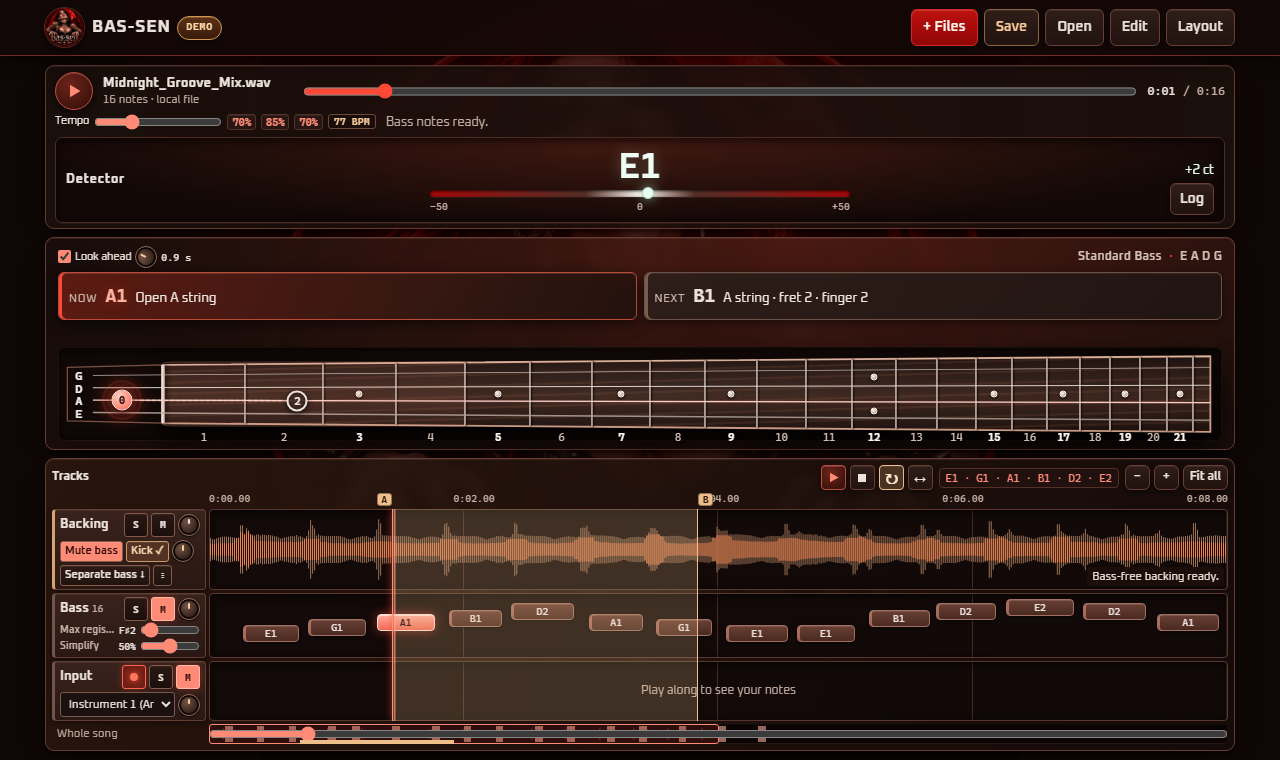
Shift your A-B loop across bars by its full length or 1-32 beats on the fly, right-click anywhere for instant STOP back to start mark, and arm Record anytime while the continuous USB interface detector checks every fret.

Step 3 · A-B Loop, 70% Tempo & Live DetectorE1 In Tune (+2 ct)
BAS-SEN workspace with active A-B practice loop, DJ loop jump selector, Master Tempo at 70% (77 BPM) and E1 tuned at +2 cents.
Uncut Desktop Capture (0:33 · Real Engine Audio) Separate · Follow · Loop 70% · Tune

Built for real practice

Everything you need in front of your hands

NEW · MIDI-READY

DAW & Standard MIDI Workflow

Export a standard MIDI bassline from Ableton Live, Logic Pro, or tools like Suno and drop it straight in. BAS-SEN automatically merges bass tracks, folds sub-bass octaves into playable E1-E4 positions, and lets you nudge or fix drifting tempo notes right inside the timeline editor.

DSP & AI Stems

Kick-Free Bass Notes & Punchy Drums

Only have a finished stereo song? Our studio-grade audio engine isolates the bassline, keep-the-kick backing, and drum pulse locally with zero cloud uploads.

34" Virtual Neck

Ergonomic 1-2-4 Fingering

Thick roundwound-style strings and high-visibility hit markers light up every fret on a true-to-scale 21-fret neck with adjustable Look ahead preview.

DJ Loop & Tempo

50-125% Tempo & Beat-Jump

Slow difficult fills down without changing pitch, shift active A-B loops forward by whole bars or beats (1-32 beats), and right-click anywhere for instant STOP.

Direct Hi-Z Input

Always-On Tuner & Clean Recording

Check tuning anytime via your USB audio interface, arm Record while playing along or paused, and auto-clear loop takes each pass so your screen stays clutter-free.

No empty promises

Built for real practice, not endless settings.

Most of us didn't buy a bass guitar to study thick theory books for six months before playing a single groove. You drop in a song you love, follow the neck with your own hands, and let muscle memory click naturally. Pure practice, zero lectures.

The Traditional Way

  • Hunting broken tabs with wrong frets and missing rhythms
  • Paying $15/mo recurring subscriptions just to slow songs down
  • Fighting blurry YouTube lessons and muddy laptop mic noise
  • Drowning in music theory before ever locking in with a track

With BAS-SEN

  • Drop any MP3, WAV, FLAC, OGG, or Suno MIDI from your drive
  • Isolate the bass and kick offline in seconds - zero uploads
  • See exact frets and fingerings in real time on a bold 34" neck
  • Pay $4.99 once and own it forever with instant offline activation

Try free or unlock forever

Download Free Demo or Unlock Full Access

Test your Windows setup and USB audio interface in minutes. Upgrade anytime right inside the app with no re-install needed.

Free Trial

BAS-SEN Free Demo

$0

Lightweight 3.5 MB Windows installer - ready in seconds

  • Visual fretboard, WAV/MIDI import & offline bass separation work out of the box
  • Plug in any USB audio interface (Hi-Z) to unlock live pitch detection and tuner
  • Import songs of any length - Demo processes and plays the first 30 seconds
  • A-B loops with DJ Beat-Jump & 50-125% pitch-locked Tempo included
Verify build safety & technical specs (Windows x64, 3.38 MiB)
Build: v1.0.0 · Windows 10/11 x64 standalone desktop installer with SHA-256 verification · 100% offline Rust / WASM DSP engine · Zero telemetry.
SHA-256: 727809efc2e4914bbdf6d54d4532205206c24045e642bce7b9068fd1eafe9a81
Launch Price - Less than a set of strings

BAS-SEN Full License

$4.99 USD

One-time payment. Lifetime offline license.

  • Unlocks full tracks up to 12 minutes across WAV, MP3, FLAC, OGG, and MIDI
  • Enables portable .bassen project export and 30-session Practice Log history
  • Instant offline unlock - no account, no cloud, no recurring DRM server
  • 14-day no-questions refund guarantee handled directly via Paddle
1. Buy once$4.99 checkout
2. Get emailInstant key sent
3. Paste in DemoUnlocks instantly

Order processing, billing, and local VAT/sales tax are handled by Paddle.com as authorized Merchant of Record. Includes at least 14 calendar days for a full refund with no questions asked. Questions: [email protected].

Questions & answers

Frequently Asked Questions

The current desktop release is built natively for Windows 10 and Windows 11 (x64). macOS and Linux support is on our radar once Windows adoption settles - if you want to try BAS-SEN today, test the free Windows Demo first on any compatible PC.

Right now BAS-SEN is focused cleanly on standard 4-string E A D G tuning (A4 = 440 Hz, 21 frets) so fingerings and open-string cues stay fast and reliable. Five-string low B and alternate tunings like Drop D / Eb are planned as future additions.

Yes - visual fretboard guidance, song/MIDI loading, offline bass separation, A-B loops, and 50-125% tempo control all work out of the box with ordinary speakers or headphones. When you want live pitch detection, instrument tuning, and note recording, plug into any USB audio interface with a Hi-Z instrument input (laptop mics are intentionally excluded to avoid room noise).

BAS-SEN has no cloud AI server bills to pass on to you - everything runs locally on your own Windows PC. When you purchase a license via Paddle, our automated system emails your offline license key straight to your inbox (usually within a few minutes). Paste it once inside the Demo app (clicking the top DEMO badge) and Full Mode stays unlocked permanently on your computers without logins or subscriptions.

BAS-SEN Studio Walkthrough (0:33 · Audio On)